Sound
The sound component controls the playback of audio samples.
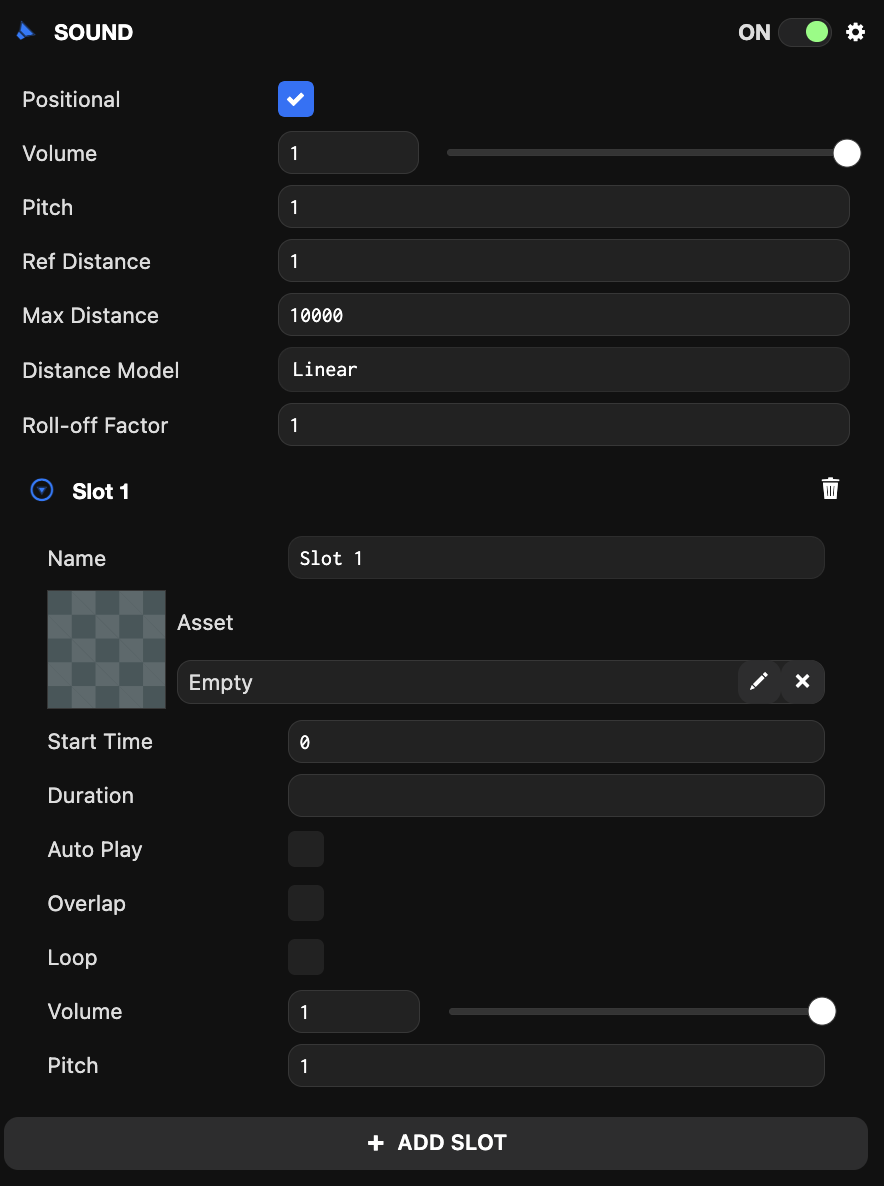
Each sound component contains "slots" responsible for sound playback. Each slot can have a different audio asset assigned and can be played independently of other slots.
You can click the "ADD SLOT" button to add a new slot. You can remove a slot by clicking the trash icon in each slot's header.
The sound component can be enabled or disabled using the toggle in the top-right of the component panel. When enabled, the component plays slots marked for auto-play. The remaining slots can be played through scripts.
Component Properties
| Property | Description |
|---|---|
| Positional | When selected, the component plays audio assets as if they are playing from the entity's position in 3D space. |
| Volume | The volume that will be multiplied with each slot's volume when playing audio assets. |
| Pitch | The pitch that will be multiplied with each slot's pitch when playing audio assets. A value of 1 means the audio plays at its original pitch. |
| Ref Distance | The reference distance for reducing volume when the sound source moves away from the listener. |
| Max Distance | The maximum distance from the listener at which audio attenuation stops. The audio volume is not necessarily 0 after this distance, but it no longer attenuates. |
| Distance Model | Determines the algorithm to use for reducing volume when the sound moves away from the listener. Can be Linear, Inverse, or Exponential. |
| Roll-off Factor | The rate at which volume attenuation occurs. |
Slot Properties
| Property | Description |
|---|---|
| Name | The name of the slot. Used to reference this slot in code. |
| Asset | The audio asset to play. |
| Start Time | The start time when the sound begins playing. |
| Duration | The duration of the sound that the slot will play from Start Time. |
| Auto Play | When selected, the slot plays when loaded. Otherwise, you must play the slot using scripts. |
| Overlap | When selected, this slot plays sounds without stopping first. Overlap should be used for one-shot sounds that need to be played repeatedly. Overlapping sounds do not stop when the entity is destroyed and only stop when completed or manually stopped from scripts. |
| Loop | When selected, the slot repeats continuously. Otherwise, it plays once until completion. |
| Volume | The volume of the audio asset played in the slot. |
| Pitch | The pitch at which the audio is played. A value of 1 means the audio plays at its original pitch. |
Scripting Interface
You can control the sound component's properties using a script component. The sound component's scripting interface is here.