Scrollview
The scrollview component defines a scrollable area in the user interface. The scrollview can be scrolled through scrollbar components.
For more details, see the User Interface section.
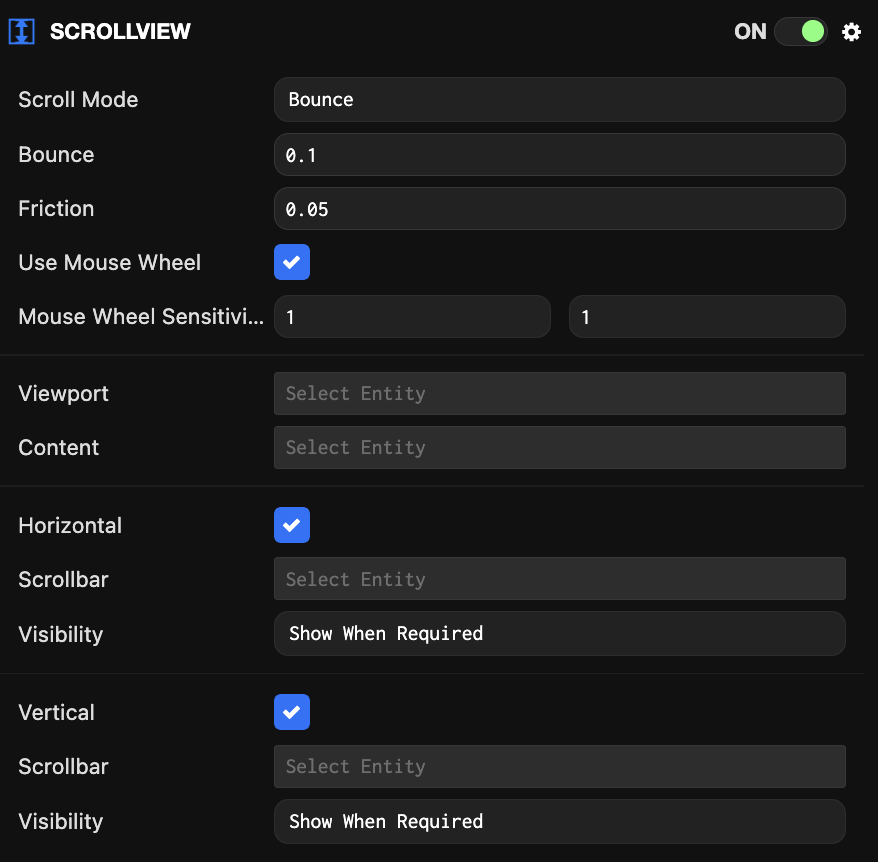
Component Properties
| Property | Description |
|---|---|
| Scroll Mode | Specifies how the scroll view should behave when the user scrolls past the end of the content. Modes are defined as follows:
|
| Bounce | Controls how far the content must move before it returns. |
| Friction | Controls how freely the content should move when thrown, i.e., when flicking on mobile or throwing the mouse scroll wheel. A value of 1 means the content stops immediately, and 0 means the content continues moving forever (or until it reaches the content's boundaries, depending on the scroll mode). |
| Use Mouse Wheel | Whether to use the mouse wheel for scrolling when the mouse is within the boundaries. |
| Mouse Wheel Sensitivity | The horizontal and vertical sensitivity of the mouse wheel. Only used when Use Mouse Wheel is set. Setting a direction to 0 disables mouse wheel scrolling in that direction. 1 is considered a good default sensitivity. You can set values higher or lower than 1 to adjust the sensitivity. The default value is [1, 1]. |
| Viewport | The entity to be used as the masked viewport area where content is scrolled. This entity must have an ElementGroup component. |
| Content | The entity containing the scrollable content itself. This entity must have an Element component. |
| Horizontal | Whether to enable horizontal scrolling. |
| Scrollbar (horizontal) | The entity to be used as the horizontal scrollbar. This entity must have a Scrollbar component. |
| Visibility (horizontal) | Controls whether the horizontal scrollbar should always be visible or only when the content exceeds the viewport size. |
| Vertical | Whether to enable vertical scrolling. |
| Scrollbar (vertical) | The entity to be used as the vertical scrollbar. This entity must have a Scrollbar component. |
| Visibility (vertical) | Controls whether the vertical scrollbar should always be visible or only when the content exceeds the viewport size. |