Particle System
The particle system component specifies a particle emitter in 3D space.
The particle system component can be enabled or disabled using the toggle in the top-right of the component panel. When enabled, the particle system is added to the scene and rendered.
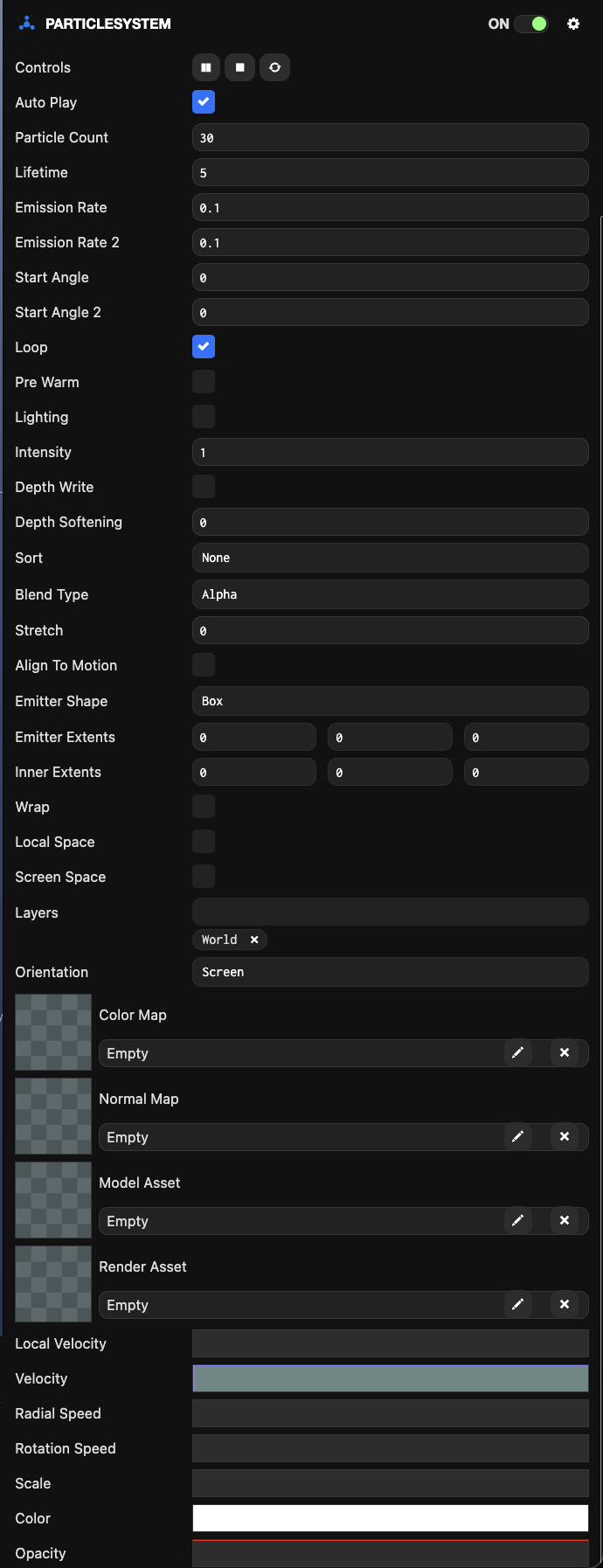
Properties
| Property | Description |
|---|---|
| Auto Play | When checked, the particle system plays immediately when created. If this option is not checked, you must call the particle system component's play function from a script. |
| Particle Count | The maximum number of particles this particle system manages. |
| Lifetime | The time in seconds between particle creation and destruction. |
| Emission Rate | The lower bound of the time range that defines particle creation intervals. The next particle emission time is randomly selected between 'Emission Rate' and 'Emission Rate 2'. |
| Emission Rate2 | The upper bound of the time range that defines particle creation intervals. The next particle emission time is randomly selected between 'Emission Rate' and 'Emission Rate 2'. |
| Start Angle | The lower bound of the initial particle rotation specified in degrees. For each particle, this angle is randomly selected between 'Start Angle' and 'Start Angle 2'. |
| Start Angle2 | The upper bound of the initial particle rotation specified in degrees. For each particle, this angle is randomly selected between 'Start Angle' and 'Start Angle 2'. |
| Loop | When checked, the particle system emits infinitely. Otherwise, it stops after emitting the number of particles specified by the 'Particle Count' property. |
| Pre Warm | When enabled, the particle system initializes as if it has completed a full cycle. This option can only be used with looping particle systems. |
| Lighting | When checked, particles are lit by directional and ambient lighting in the scene. In some cases, it may be beneficial to set a normal map on the particle system for more realistic lighting. |
| Half-Lambert | Enabling half-Lambert lighting prevents particles from appearing too flat when lit from behind. This is a completely non-physical lighting model but can provide more pleasing visual results. This option is only available when lighting is enabled. |
| Intensity | Scales the particle's color to allow for arbitrary brightness. |
| Depth Write | When checked, particles write depth information to the depth buffer. When unchecked, the depth buffer is not modified and particles overwrite each other based on rendering order. |
| Depth Softening | This variable value determines how much particles fade out as they get closer to other surfaces. This prevents situations where particles appear to cut through surfaces. Setting this value to 0 effectively disables depth softening. Setting a value greater than 0 requires the scene to be rendered to a depth target to perform depth comparison, which can have significant performance impact by increasing the total number of draw calls submitted each frame. |
| Sorting Mode | The sorting mode controls the order in which particles are rendered. Options are:
|
| Blending Mode | The blending mode determines how particles are composited when written to the frame buffer. Assuming Prgb is the particle pixel's RGB color, Pa is the alpha value, and Drgb is the RGB color already in the frame buffer, the blending options are:
|
| Stretch | A world unit value that controls how much particles stretch based on their velocity. Particles stretch from their center toward their previous position. |
| Align To Motion | Aligns particles to their direction of motion. |
| Emitter Shape | The shape of the emitter. |
| Emitter Extents | The half-extents of the local space bounding box where particles are created at random positions. |
| Inner Extents | The exception volume of the local space bounding box where particles are not created. |
| Emitter Radius | The radius where particles are created at random positions. |
| Inner Radius | The inner sphere radius where particles are not created. |
| Wrap | Enables wrapping boundaries. |
| Local Space | Binds particles to the emitter node transform. |
| Screen Space | Renders particles in 2D screen space. Should be set when the particle system is part of a hierarchy with a ScreenComponent at the root, allowing the particle system to integrate with ElementComponent rendering. |
| Layers | The layers this particle system belongs to. If a particle system belongs to multiple layers, it will be rendered multiple times. |
| Wrap Bounds | A world space AABB volume centered on the owner entity's position. When particles cross one boundary of the volume, they teleport to the opposite side. You can move the owner entity of a wrapped emitter to create environmental effects like rain. |
| Orientation | The orientation mode controls the direction of the particle plane. Options are:
|
| Particle Normal | The world or emitter space vector that defines the particle plane direction. |
| Color Map | The color map texture applied to all particles in the system. If no texture asset is assigned, a default spot texture is used. |
| Normal Map | The normal map texture applied to all particles in the system. Applying a normal map can make billboard particles appear more consistent with the scene's lighting. |
| Model Asset | The model asset. The first mesh found in the model is used to represent all particles instead of flat billboards. |
| Render Asset | A render asset that can be used instead of a model asset for rendering mesh-based particles. |
| Local Velocity | A curve that defines how each particle's velocity relative to the particle system's local coordinate system changes over time. If two curves are specified in the curve editor, local velocity becomes a random interpolation between the two curves. |
| Velocity | A curve that defines how each particle's velocity relative to the world coordinate system changes over time. If two curves are specified in the curve editor, velocity becomes a random interpolation between the two curves. |
| Radial Speed | A curve that defines how the particle's radial speed changes over time. Individual particle radial speed points from the emitter origin to the particle's current position. If two curves are specified in the curve editor, the value becomes a random value between the two curves. |
| Rotation Speed | A curve that defines how each particle's angular velocity changes over time. If two curves are specified in the curve editor, angular velocity becomes a random interpolation between the two curves. |
| Scale | A curve that defines how each particle's scale changes over time. By default, particles have a width and height of 1 unit. If two curves are specified in the curve editor, scale becomes a random interpolation between the two curves. |
| Color | A curve that defines how each particle's color changes over time. |
| Opacity | A curve that defines how each particle's opacity changes over time. If two curves are specified in the curve editor, opacity becomes a random interpolation between the two curves. |
Scripting Interface
You can control the particle system component's properties using a script component. The particle system component's scripting interface is here.