Rendering Settings
Controls lighting, resolution, and rendering features.
note
These settings affect all users on the currently active branch of the project.
Navigate to the RENDERING section and expand the panel:
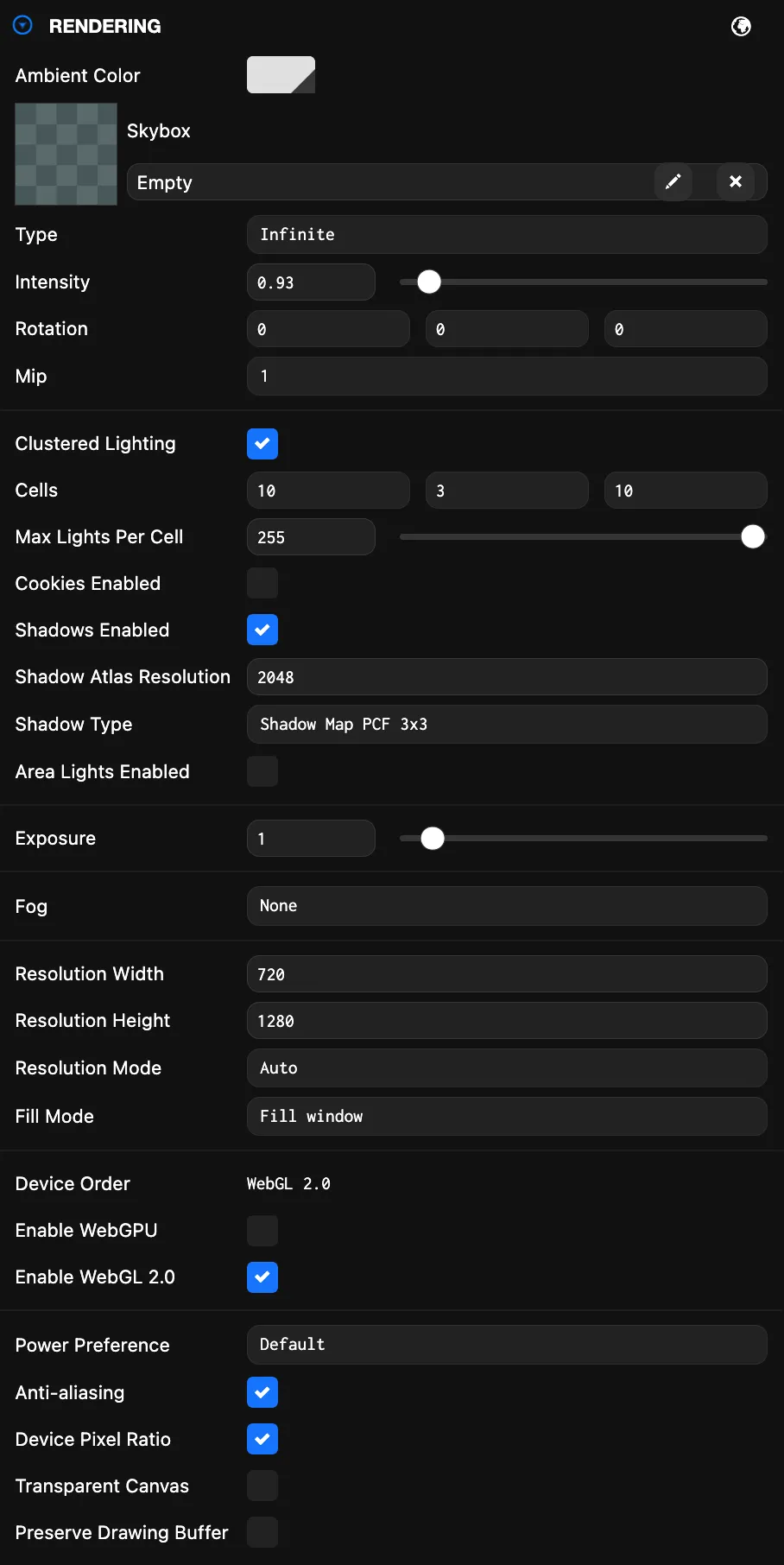
Here is a breakdown of the available settings:
Environment
| Setting | Description |
|---|---|
| Ambient Color | The color of the scene's ambient light, specified in sRGB color space. |
| Skybox | A cubemap asset rendered behind your 3D scene. Also used as the default environment map for physical materials when prefiltered. |
| Type | Select the projection used to render the skybox cubemap:
|
| Intensity | The skybox intensity, used to match exposure levels. |
| Rotation | Rotation of the skybox. |
| Mip | Mip level of the prefiltered skybox. Higher values select lower-resolution, more blurred mips. |
Clustered Lighting
| Setting | Description |
|---|---|
| Clustered Lighting | Enable clustered lighting. |
| Cells (X, Y, Z) | Number of cells per world-space axis used to subdivide the space containing lights. |
| Max Lights Per Cell | Maximum number of lights a cell can store. |
| Cookies Enabled | Clustered lights support cookies. |
| Cookie Atlas Resolution | Resolution of the atlas texture storing all non-directional cookie textures. |
| Shadows Enabled | Clustered lights support shadows. |
| Shadow Atlas Resolution | Resolution of the atlas texture storing all non-directional shadow textures. |
| Shadow Type | The type of shadow filtering used by all shadows. |
| Area Lights Enabled | Clustered lights support area lights. |
Exposure & Fog
| Setting | Description |
|---|---|
| Exposure | The exposure value tweaks the overall brightness of the scene. |
| Fog | Controls an approximation of ambient fog in your scene. Types:
|
Resolution
| Setting | Description |
|---|---|
| Resolution Width / Height | The width/height of your application in pixels. |
| Resolution Mode | Decides whether the canvas resolution changes when it is resized. |
| Fill Mode | Decides how the canvas fills the browser window. |
Device & API
| Setting | Description |
|---|---|
| Device Order | The order in which attempts are made to create the graphics devices. |
| Enable WebGPU | When enabled, the application will try to use WebGPU if available. |
| Enable WebGL 2.0 | When enabled, the application will try to use WebGL 2.0 if available. |
Rendering Options
| Setting | Description |
|---|---|
| Power Preference | Provides a hint to WebGL regarding the preferred power mode:
|
| Anti-aliasing | When disabled, anti-aliasing is disabled for the back buffer. |
| Device Pixel Ratio | Multiplies the canvas back buffer resolution by the device pixel ratio (e.g., 2x on Retina). Increases sharpness and GPU/memory usage. |
| Transparent Canvas | Makes the canvas background transparent so the web page shows through. Useful for overlaying the app on custom page designs or UI. |
| Preserve Drawing Buffer | Preserves the drawing buffer until explicitly cleared. Useful for taking screenshots. |