Clustered Lighting
Lighting is a great way to add realism to your application. However, real-time lighting can incur significant runtime performance costs, especially when there are many lights casting shadows.
Part of the solution to reduce performance costs can be to limit the number of lights that affect individual meshes. This is often implemented by finding and using lights near each object. However, this strategy has several disadvantages:
- Since each object can use a different set of lights, custom shaders need to be compiled to handle this.
- For this strategy to be effective, large objects need to be split into smaller objects.
- A large number of shadow-casting lights can cause shaders to use all available texture slots for shadow maps.
To solve these problems, OasisW uses a clustered lighting solution that provides a performance-optimized implementation for omni lights and spot lights. This stores information about lights in textures and allows the GPU to easily use only the lights near the shaded fragment. Clustered lighting has several advantages:
- Shaders don't need to be recompiled when lights are added or removed from the scene because shaders can handle multiple lights.
- A large number of lights (including shadows and cookies) can be used in the scene because only lights near each pixel are evaluated.
Directional lights affect all objects, so they don't use the clustered lighting solution.
Implementation Overview
The following steps provide a basic overview of the clustered lighting implementation:
-
Cull lights against all camera frustums to evaluate the list of visible lights for the frame.
-
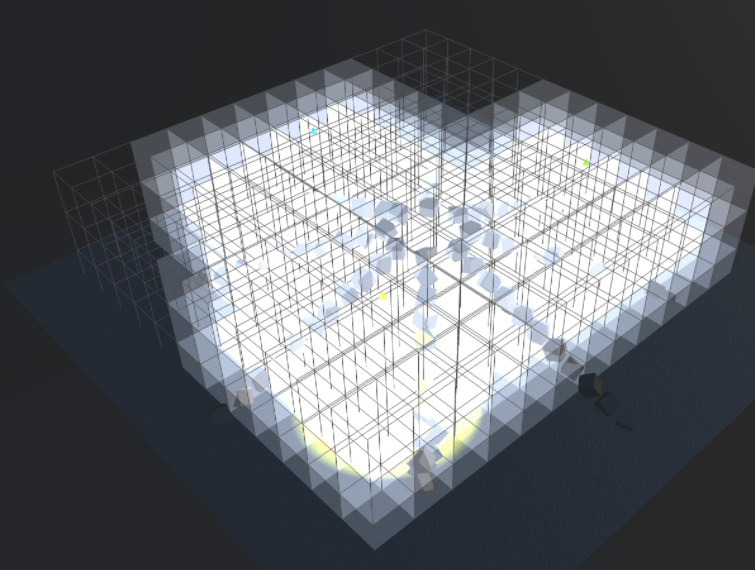
Place a world-space 3D grid over the axis-aligned bounds of all visible lights.
-
Each cell of the 3D grid stores the indices of lights that intersect it. On the CPU, this information is updated every frame and can be used to get the list of lights affecting any position. This information is stored in textures and made available to the GPU.
-
Properties of all visible lights are stored in another texture so they can also be accessed by the GPU.
-
Shadow maps and cookie textures are rendered as atlases instead of individual textures, so the shader can access everything simultaneously.
-
During light evaluation in the fragment shader, the fragment's world space position is used to access the 3D grid cell and evaluate the stored lights.
Editor Options
Clustered lighting options can be found in the editor settings under 'Rendering'.
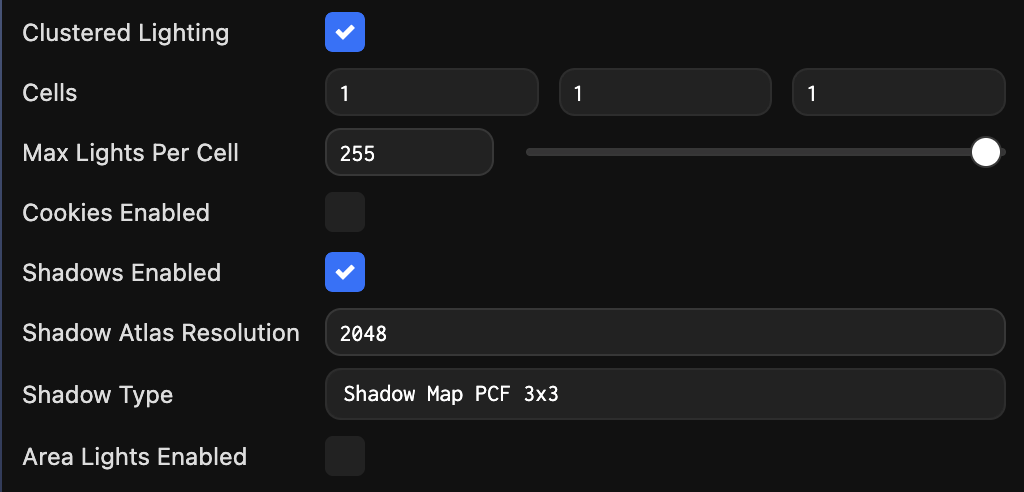
This allows you to disable clustered lighting (if you need to use the previous lighting system). It also enables performance and feature tuning mentioned below.
Tuning Clustered Lighting
Enabling Features
The clustered lighting shader must handle all supported lights, so it needs to include code to handle these features. This can cause the shader to be larger than necessary and take longer to compile. To solve this problem, there is a set of feature options that allow you to disable features that are not needed in your application and speed up shader compilation:
- Shadows Enabled – Enable or disable shadow support
- Cookies Enabled – Enable or disable light cookie support
- Area Lights Enables – Enable or disable area light support
Configuring the 3D Grid
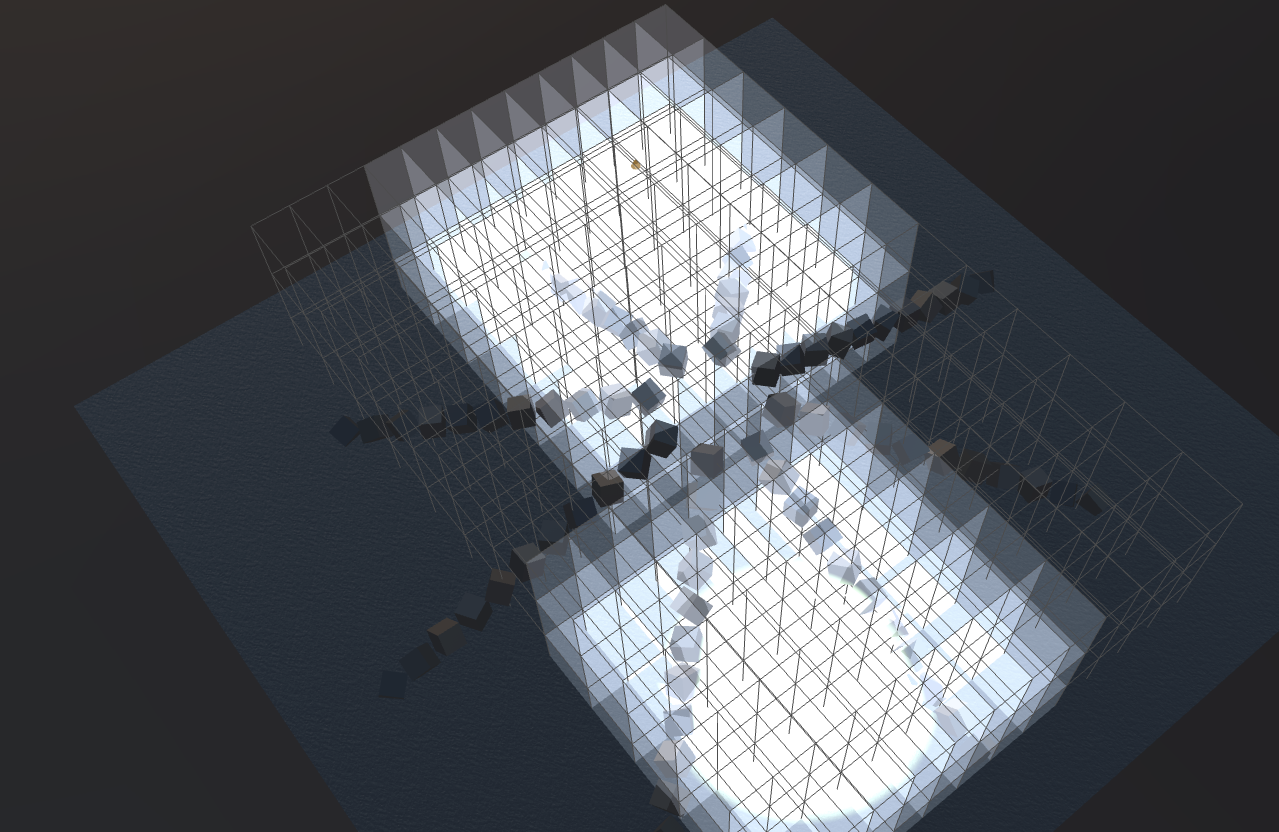
The Cells property allows you to specify the number of cells along each world axis. This dynamically subdivides the axis-aligned bounding box containing all visible lights into the specified number of cells.
The Max Lights Per Cell property allows you to specify the maximum number of lights stored in each individual cell. This represents the maximum number of overlapping lights. Generally, you need to increase the number of lights for coarser grid subdivisions because light overlap is greater.
Limitations
Internally, light indices are stored using 8 bits, so the maximum number of visible lights per frame is 254 (one index is reserved). In the future, there may be additional options to store indices using 16 bits and increase the limit.
Performance Considerations
- Cell subdivision should be as small as possible. Large cell subdivisions result in higher CPU usage when the grid is filled with lights every frame. This should be optimized for each scene depending on lighting complexity. Ideally, there should be enough cells to limit light overlap and the number of lights per cell.
- Max Lights Per Cell should be as small as possible. This limits the size of the texture used to store the 3D grid that needs to be updated every frame.
- If an application using clustered lighting runs slowly on older mobile devices, consider globally turning off features like shadows or cookies.
Render Debug Grid
To help with debugging and performance tuning of clustered lighting, you can assign a Layer ID to LightingParams' debugLayer. For example:
// Assuming in a script type
this.app.scene.lighting.debugLayer = this.app.scene.layers.getLayerByName("World").id;
To stop rendering, assign undefined to the debugLayer property:
// Assuming in a script type
this.app.scene.lighting.debugLayer = undefined;