Particles
OasisW provides comprehensive support for particle system creation and editing.
What is a Particle System?
A particle system is a simulation that manages many independently moving particles. It can be used to approximate a huge number of effects such as rain, snow, smoke, fire, etc.
Particles are not physically simulated. They don't interact with each other or collide. They will pass through surfaces in the scene.
Creating a Particle System
When unselected, particle systems are displayed with the following icon in the editor's 3D view:

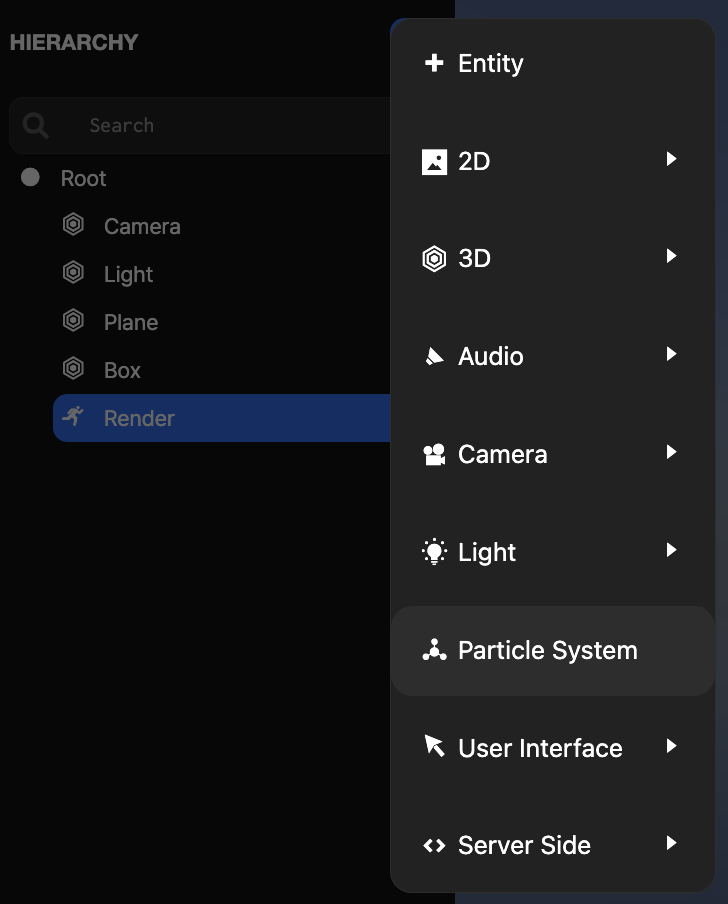
To create a new particle system, create a new entity and add a particle system component. For convenience, there's an item in the editor menu that does this in one step:
A newly created particle system with default settings looks like this:

To configure the particle system through the particle system component interface, see the reference here.
Triggering Particle Systems from Scripts
Sometimes you may want particle systems to play at specific events or times. For example, an explosion should play when a missile reaches its target. To do this, make sure the particle system's auto-play option is disabled. Then attach a script component to the particle system entity. The following two lines will start (or restart) the particle system:
this.entity.particlesystem.reset();
this.entity.particlesystem.play();
Soft Particles
Soft particles are particles that fade out near intersections with scene geometry. When soft particles are enabled using depthSoftening, depth map rendering must be enabled on the camera that renders the particles.